
You have made an appointment with us for a 90 minutes consult. 🥳
By making this appointment with us, you agree to adhere to our policies which you can read in their entirety here.
If you chose a package, you will receive the link to book the following three appointments (at no additional cost) after the first appointment.
Before our appointment
You will soon receive an email that will contain the link to the Zoom consult for the day and time that you have chosen.
If you are new to ZOOM, we recommend that you watch the two following videos:
If the internet link were to lapse during the consult, simply log in again with the same link.
Do not forget to update Zoom before the day of our appointment if you are using the desktop app.
To send us your photos and videos as described below, please use WeTransfer and use the following recipient email: client@foliesfelines.com (no need to create an account, just click on “I just want to send files”).
If you are new to WeTransfer, here is a video explaining how to use it to send files: WeTransfer Video
Please try to fill out the questionnaire and to send us the plan drawing, the photos and the videos at least 48 hours before the appointment so that we have the time to go through them before our appointment, which will allow us to optimize our time together.
If you do not currently have the time to complete all the following steps, don’t worry, the link to this page will be sent to you by email in the next few days so that you can come back to it later. Alternatively, if you do not want to have to wait for the email, you can add this page to your favorites or pin this tab.
Check your spam email folder if you do not seem to receive our email in the next few days and add client@foliesfelines.com to your safe email sender list. If you do not know how to check your SPAM folder, here is a tutorial on how to do that with Gmail (the process is similar across most emails/apps/softwares): SPAM video
Please fill out the following pre-consult questionnaire: QUESTIONNAIRE
Please also provide us with the following:
1. A freehand drawing of all the floors/basements of the house, including the location of:
- Doors
- Windows
- Walls
- Stairs
- Litter boxes
- Resting spots
- Sources of water
- Sources of food
- Scratchers
- Perches/Cat trees
- Approximate furniture
- Locations where the problematic behavior occurs
- Approximate surroundings of the house (yard, sidewalk, fence, etc.)
Don’t hesitate to use a color code and a legend to make it easier for you !
Take a picture of your drawing(s) and send us the pictures. Here is an example:
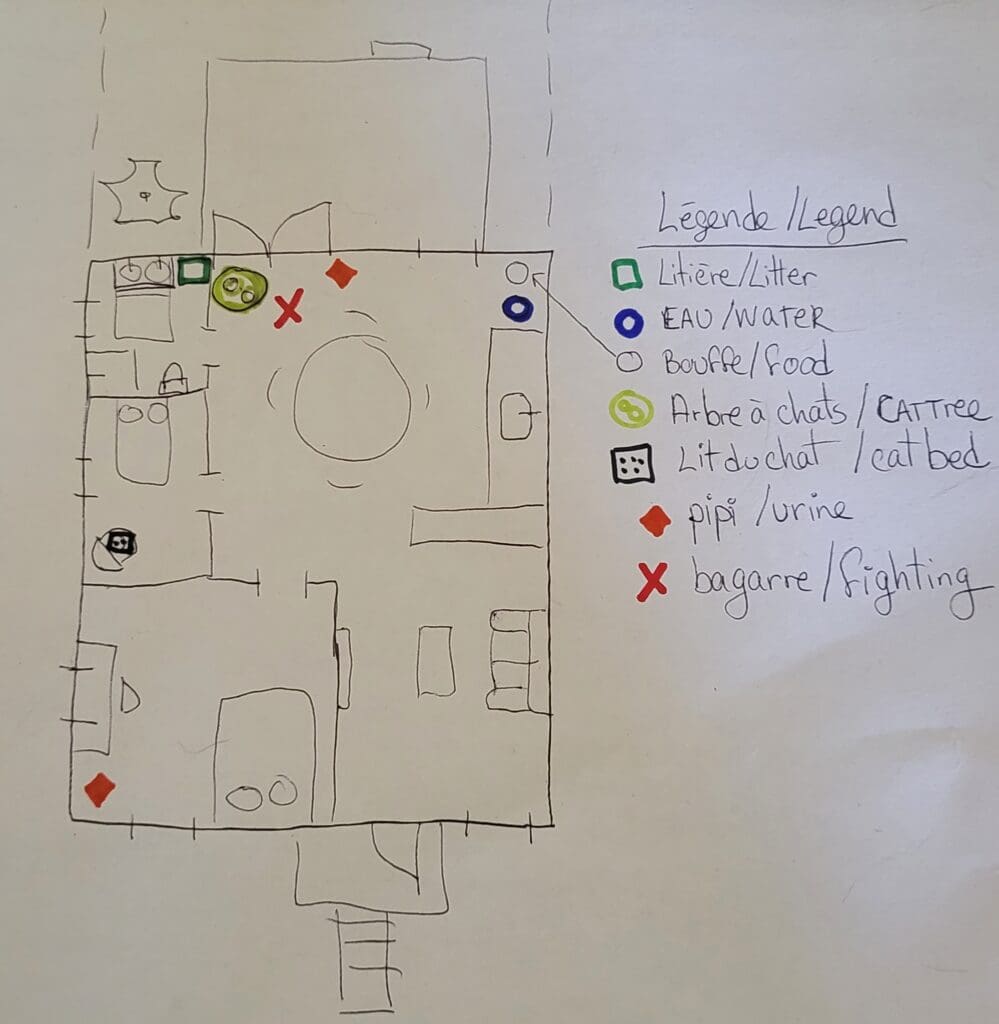
2. Quick video of the house (Take me for a quick tour around the house without speaking because I will look at it in fast-forward. Point the camera at the cat’s things when you encounter them.)
3. Videos of the PAST problematic behaviors if you have saved them. DO NOT ATTEMPT TO CAUSE THE PROBLEMATIC BEHAVIOR JUST TO BE ABLE TO FILM IT.
4. Picture of the litter boxes (whatever the reason for the consult)
5. Picture of the animal facing it while it is standing
6. Picture of the animal from the side while it is standing
7. Picture of the animal seen from above while it is standing
8. Short video of the cat eating
9. Short video of the cat playing
10. Short video of the animal walking in the house
11. Short video of the cat going up and down something (examples: chair, stairs, cat tree, etc.)
12. If the problem is related to urine or feces outside of the litter box: Pictures of the urine and/or feces if possible.
Do not stress out your animals just to get pictures or videos!
If the cat never gets up on anything, do not force it to! Simply do the best you can. 🙂
How to obtain useful pictures and videos
Lighting:
- Natural light is best
- Otherwise, use as many lights as possible
- Make sure that the source of light/window behind you, not facing you. Otherwise, the cat will be dark against a backdrop of light.
- Do not use a flash when you film or take a picture because the light will be annoying to the cat and will change their behavior.
To get a stationary cat for a picture from the side or from above:
- Feed them with one hand and take the picture with the other.
- Put a spread of food on a wall or on a cabinet door, at a normal height for the head of the cat. This will occupy them while you take a picture.
Camera orientation for the videos:
- Landscape mode, not Portrait. (Phone held horizontally, not vertically)
Tips for filming in a stable manner:
- Use a bottle and elastics as a tripod as explained in this video.
- Move the camera really slowly while following the cat.
- Use a tripod.
- Put your phone in a cup or a shoe to make it stand straight and stable.
To get a cat that moves (some ideas) :
- Call your cat.
- Shake a treat bag.
- Slide a treat on the floor.
- Place a treat on a chair/a cat tree, etc. to encourage them to get up on it.
- If your cat never gets up on objects, do not force them to.
Thank you for taking the time to fill out and send us all of this information!
We are excited to meet you!